OkCupid Review: I Answered 100 Questions to See If Match % Really Works

Every dating app claims to know what you want. OkCupid is one of the few that actually asks. Its whole idea is built on questions: you answer them, the app compares your answers with everyone else’s, and each profile gets a Match % that’s supposed to tell you how compatible you are.
That number is what made me curious. So for this OkCupid review, I set myself one simple task: answer around 100 questions and then watch whether the people with a high Match % really led to better conversations than the people with a lower one. I spent 28 days on one profile, from October 20 to November 16, 2026, first on a free account and then on Premium, mostly in the iPhone app and sometimes on my laptop.
My test setup
- Test period
- 28 days, October 20 – November 16, 2026
- Devices
- iPhone app + desktop browser
- What I used
- Free account for two weeks, then a 1-month Premium subscription
- Profiles
- One personal test profile
Quick verdict
My overall score after 28 days. See the breakdown
Good for
- People who want compatibility signals before messaging
- Detailed profiles with more than photos
- Inclusive gender and orientation options
Might not suit
- Anyone who needs responsive customer support
- People who want unlimited likes on a free account
- Those who live in a small town
What Is OkCupid?
OkCupid is an online dating app and website that launched in 2004 and is now part of Match Group. Its homepage greets you with “Dating for every single person”, and its About page sums up the approach in four words: “Match on what matters.” The app asks you questions about the things you care about, from everyday habits to bigger values, and uses your answers to calculate how compatible you are with other members.
OkCupid is also known for how many ways it lets you describe yourself. It became the first dating app to offer 22 gender and 13 orientation options in 2014, and the list has grown since. You can also say what you’re looking for, whether that’s something long-term, short-term dating, or new friends.
| Platform type | Online dating app and website |
|---|---|
| Launched | 2004, now part of Match Group |
| Access | iOS and Android apps, plus a desktop website |
| Registration | Free account with profile, questions, browsing and messaging with mutual matches |
| Paid features | Premium plans that add unlimited likes, a list of who liked you and extra filters |
| Core feature | Match % based on thousands of optional compatibility questions |
| Support | Online Help Center with a contact form; no phone line |
My OkCupid Rating at a Glance
I score every platform on the same seven criteria, so the numbers are comparable across reviews. You can read how each one is measured on our testing methodology page.
How I Tested OkCupid
From October 20 to November 16, 2026, I used one personal profile, mostly in the OkCupid app on my iPhone and sometimes on the desktop site. For the first 14 days, I stayed on a free account, then switched to one month of Premium. I answered around 100 compatibility questions, browsed every section, sent intros and replies daily, kept notes on which conversations went somewhere, used the block and report tools, contacted support once, and judged everything against our seven criteria.
Signing Up: Questions Before Photos
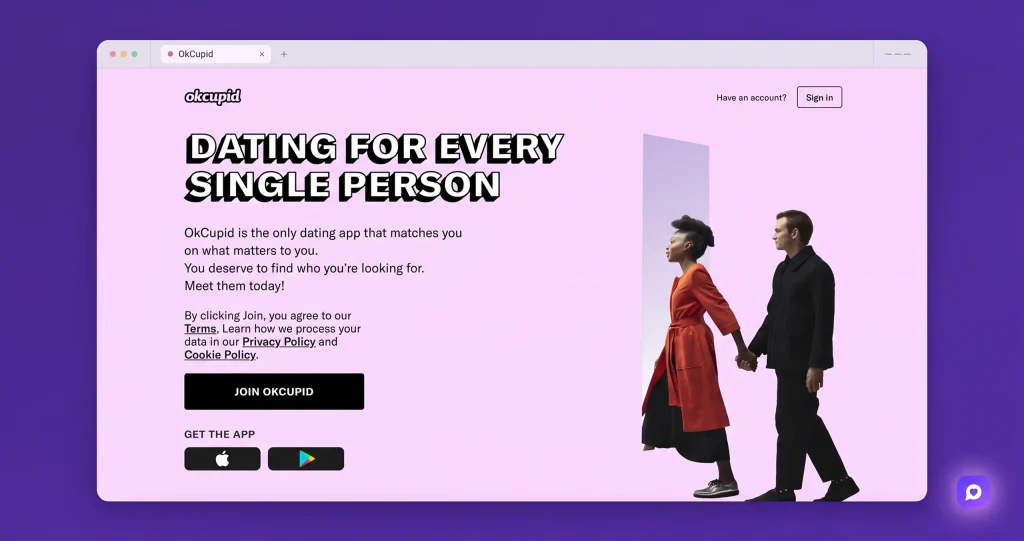
OkCupid asks more of you upfront than most apps. It took me longer than usual to get through sign-up, but by the end the app knew a lot more about me than a few photos could tell it.
The basics
I signed up in the app with my email, then added my first name, date of birth, and location. OkCupid also asked me to confirm I wasn’t a robot, which takes an extra screen or two.
Identity and what you’re looking for
Next, OkCupid asks how you identify and who you’d like to see, with far more options than the usual two or three. You also choose what you’re looking for: long-term, short-term, new friends, or not sure yet. I liked that these questions came early, because they shape everything you see afterward.
Photos and prompts
I added a clear main photo, a full-length picture, and a couple of everyday shots, then answered two of the profile prompts. Prompts are optional, but they gave people something specific to write about, and most of my first messages later started there.
The first questions
Then come the questions OkCupid is known for. You answer a short set to start, and for each one you can say which answers you’d accept from someone else and how much it matters to you. You can also keep an answer private, so it counts for matching but isn’t shown on your profile. I kept going well past the minimum and reached about 100 questions by the end of my first week.
Logging in later
The OkCupid app keeps you signed in. On desktop, you press “Sign in” on the homepage and use the same email or phone number you registered with.
The Question Test: Does Match % Predict a Good Conversation?
This was the part I was most curious about. Every profile on OkCupid shows a Match %, and you can tap it to see where your answers agree and where they don’t. So for four weeks I paid attention to one thing: did the high percentages actually lead to better conversations?
What the high percentages gave me
My highest-percentage conversations started easily. With one fellow book lover in the low 90s, we agreed on almost everything in the breakdown, and the first few messages were warm and polite. But after a few days, the chat ran out of energy. We had nothing to disagree about, and somehow nothing to talk about either.
Where the lower percentages surprised me
Some of my best conversations came from profiles in the 60s and 70s. One started from a single question we had answered differently, about how we like to spend Sunday mornings, and turned into a long, funny exchange that lasted most of a week. The difference gave us something to talk about.
What I concluded
In my experience, the Match % is very good at one job: filtering out people whose answers clash with things that truly matter to you. It’s much less useful at predicting whether a conversation will flow. What made the difference was a specific opening, usually about a prompt or one particular question. My advice: use the percentage as a filter and the question breakdown as a conversation starter.
How Finding People Works on OkCupid
Discover and DoubleTake
Discover is the main feed: one profile at a time, where you like or pass. It feels familiar if you’ve used any swipe-style app, but each card shows more than a photo, including the Match %, prompts, and a few details. Mutual likes become matches you can message for free.
Cupid’s Picks and other curated stacks
Along the top of the app sit separate stacks such as Recommended, Cupid’s Picks, and Match %. Cupid’s Picks highlights people OkCupid thinks fit you particularly well. I found the Match % stack the most useful during my question test because it let me compare different percentages side by side.
Intros: one message before a match
You can send an intro, a short first message, to someone before they’ve liked you back. If they reply or like you, the conversation opens up. I used intros sparingly and only when a prompt or answer gave me something specific to say, and those got far more replies than a simple hello.
Filters and dealbreakers
Basic preferences such as age range and distance are available on the free account. Dealbreakers, which turn a preference into a hard rule, are part of Premium. I kept most filters fairly open because the question test worked better with a wider mix of people.
Free vs. Premium: Two Weeks of Each
What the free account covers
A free OkCupid account does a lot: a full profile, unlimited questions, browsing, Match %, intros, and messaging with mutual matches. That’s more than many apps allow without paying.
How the daily like cap feels
The catch is a daily limit on likes. In my first few days, I ran out by early evening, which pushed me to be more selective. That isn’t all bad, but it does slow you down if you browse a lot. The free version also shows ads.
What Premium changed
When I upgraded in week three, the biggest change was the Likes You list: instead of a blurred section, I could see everyone who had already liked me, which saved a lot of time. Unlimited likes, no ads, and dealbreaker filters came with it. The app itself looked the same.
Was it worth it?
For me, Premium was a convenience rather than a necessity. If you check the app daily and get a lot of likes, seeing them in one list can be worth it. If you’re patient, the free account is enough to find out whether OkCupid suits you. Plans and prices change often and can vary by person and country, so check the current options in the app, and remember that subscriptions renew automatically.
OkCupid Then and Now
Longtime members often say OkCupid isn’t what it used to be. The biggest change came in 2023, when the long open-ended profile essays were removed in favour of shorter prompts, according to several independent reviews. Messaging anyone at any time was also replaced by today’s like-and-intro system. What remains is the part many people still love: thousands of compatibility questions and a detailed Match % breakdown. In my experience, those still set OkCupid apart, even if profiles are shorter than they once were.
Is OkCupid Safe?
Fake profiles are the top complaint about OkCupid on review sites, so I paid close attention. Here’s what the app offers and what I saw.
Block and report
You can block or report a profile from the menu on any profile or conversation. Blocking removes the person from your lists and stops contact, and they aren’t notified. In my second week, one match asked to move to another messaging app within a few messages and then mentioned an “investment”. I reported and blocked the profile, and it took a few taps.
Photo verification
OkCupid offers photo verification, which adds a badge to verified profiles. I verified mine during sign-up, and I gave verified profiles a little more trust when deciding whom to reply to.
Keeping some answers private
Any question can be answered privately. It still counts toward your Match %, but other members can’t see your answer. I used this for a few questions I didn’t want on my public profile, and I’d recommend it for anything personal.
My safety tips
- Keep conversations in the app until you’ve had a video call.
- Treat any request to move chats elsewhere quickly, or any mention of money or investments, as a warning sign.
- Reply to verified profiles first when you’re unsure.
- Answer sensitive questions privately.
Is OkCupid Legit?
Yes. OkCupid has been running since 2004, belongs to Match Group, publishes its Terms, Privacy Policy, and Community Guidelines, and its apps are available on the App Store and Google Play. During my test, sign-up, matching, messaging, and Premium worked as described.
When people ask whether OkCupid is a scam, they usually mean whether it has fake profiles. The honest answer is that some suspicious accounts do get through, and many reviewers are angry about it. Most people I talked to were ordinary members, but you still need to stay alert.
OkCupid Customer Service
Support starts in the Help Center, which covers accounts, billing, safety, and technical questions. If you can’t find an answer, you send a request through a contact form; I didn’t find a phone line or live chat. I asked one question about how auto-renewal works on an App Store subscription. The answer arrived a few days later, was clearly templated, and pointed me to my phone’s settings. It was correct, but slow and impersonal, which matches what many reviewers say and is why support gets 3 out of 5.
The OkCupid App vs. the Website
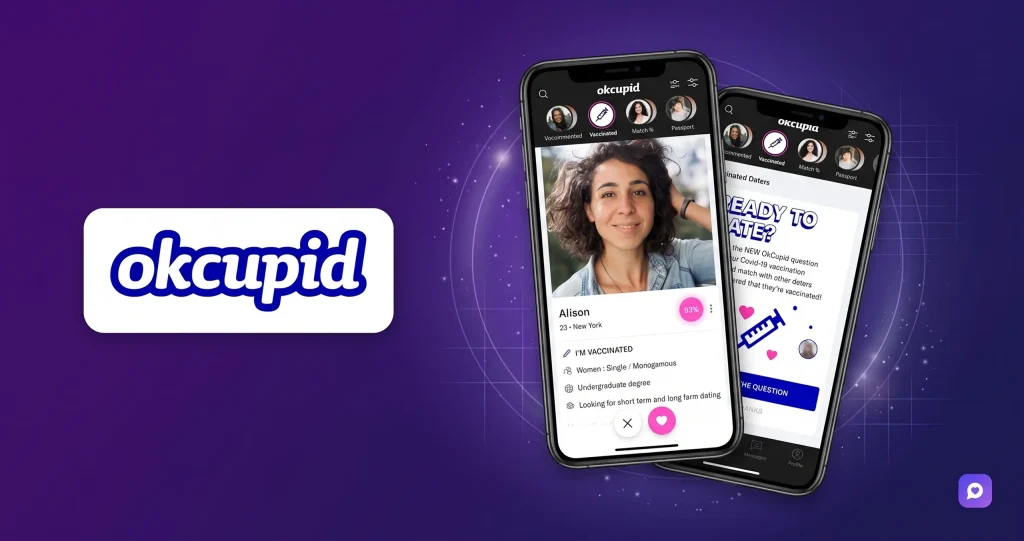
OkCupid is built around its app, available for iPhone and Android, and that’s where I spent most of the test. It was quick and had every feature I needed, though a few screens feel dated next to newer apps. The desktop site is handy for answering questions on a bigger screen, and I used it for exactly that.
OkCupid Pros and Cons
What I liked
- Thousands of questions and a detailed Match % breakdown
- Messaging with mutual matches on a free account
- Intros let you write before a match
- Inclusive gender, orientation and intention options
- Private answers for sensitive questions
What could be better
- Daily like cap and ads on the free account
- Seeing who liked you requires Premium
- Suspicious profiles still get through
- Support is form-based and slow
- Shorter profiles since the essays were removed
What Other Members Say
Four weeks on one profile is one experience, so I also looked at what OkCupid members say in app stores and on review sites. The gap between them is striking.
Ratings on review sites (as of November 25, 2026)
| Source | Rating | Number of reviews |
|---|---|---|
| App Store | 4.3 / 5 | 290K ratings |
| Google Play | 3.4 / 5 | 691K reviews |
| Trustpilot | 1.2 / 5 | 891 |
| ConsumerAffairs | 1.1 / 5 | 364 |
App store ratings come mostly from everyday users leaving a quick score, while Trustpilot and ConsumerAffairs tend to attract people who ran into a problem. Both are worth reading, but they describe very different moments.
“It is a free dating website and the questions asked and the ability to form an idea of the people that participate is well organized. The photos are easy because you can enlarge them.”
★★★★☆ Leni, January 9, 2017, ConsumerAffairs
“Almost all profiles have no effort applied to them (few photos, less than 6 words of writing, no details section completed)…”
★☆☆☆☆ OkNotCupid, October 30, 2026, Trustpilot
“Not even a match in a few days…”
★☆☆☆☆ catalina anton, November 9, 2026, Trustpilot
“A month’s membership, whatever you call it, they do not let you make endless comments, in other words, you gotta keep paying.”
★☆☆☆☆ Jo, November 21, 2026, Trustpilot
“I was on this site for a little while, things were going ok and then all the sudden my account was suspended… I have absolutely no understanding as to why.”
★☆☆☆☆ Sandra, November 19, 2016, ConsumerAffairs
These excerpts are a selection from public review sites, chosen to show both positive and critical feedback. They are individual opinions, may be shortened (marked with “…”), and may not represent every member’s experience. Some ConsumerAffairs reviews describe the platform as it was several years ago.
Recurring complaints. On Trustpilot and ConsumerAffairs, the most common complaints are fake or low-effort profiles and likes that seem to come from accounts with no interest in a conversation, followed by sudden account suspensions without a clear explanation. Members also mention the cost of Premium and auto-renewal surprises, slow or unresponsive support, few members outside big cities, and disappointment that the profile essays were removed. Neither profile has been claimed by OkCupid, and the company doesn’t reply to reviews there. On the positive side, app store reviewers and many independent reviews praise the compatibility questions and the free messaging with mutual matches.
Canceling Premium and Deleting Your Account
OkCupid subscriptions renew automatically, so set a reminder before the renewal date if you only want one month. If you bought Premium in the app, you cancel it in your phone’s settings: on an iPhone through your Apple ID subscriptions, on Android through Google Play. If you bought it on the website, you turn off automatic billing in your OkCupid settings. That’s what I did at the end of the test.
Deleting your account is a separate step in the app’s settings. Deleting the account doesn’t cancel an app-store subscription, so cancel that first.
Who I’d Recommend OkCupid To
I’d recommend OkCupid to people who want to know more than a photo before they write, enjoy answering questions about themselves, and value seeing where they agree or disagree with someone. It also suits anyone who wants to describe their identity and intentions in their own words.
It’s probably not the right fit if you need quick, personal support, want to like as many profiles as you want without paying, or live somewhere small, where the pool of members thins out fast.
My Final Verdict
OkCupid’s questions are still its biggest strength: the Match % won’t predict chemistry, but it’s an excellent filter and the breakdown gives you something to talk about. The free account covers more than most apps, and the profiles have more depth than on most apps. Slow support, a daily like cap, Premium-only features and persistent complaints about fake profiles hold it back, so it suits patient people who enjoy getting to know someone through their answers.
Visit OkCupid