Callyourdate Review: Three Weeks of Quiet Evenings on the Platform

Most dating platforms are built for the middle of the day: quick swipes on a lunch break and a reply between meetings. Callyourdate says it’s built for something else: the quieter moments when you’d rather have one warm conversation than fifty quick ones. So I decided to test it exactly then.
This Callyourdate review covers 21 evenings on one personal account, from October 27 to November 16, 2026. I only logged in after work, usually with a cup of tea, on my laptop or on my phone from the sofa. The question I kept asking was simple: does Callyourdate actually feel calm, or does it only promise to?
My test setup
- Test period
- 21 evenings, October 27 – November 16, 2026
- Devices
- Desktop browser + mobile browser
- What I used
- Free registration plus paid features
- Profiles
- One personal test profile
Quick verdict
My overall score after 21 evenings. See the breakdown
Good for
- People who like a slow, unhurried pace
- Writing longer, thought-out messages
- Getting to know someone through their posts first
Might not suit
- Anyone who needs detailed search filters
- People who want a separate mobile app
- Those who expect every feature to come with registration
What Is Callyourdate?
Callyourdate is an online dating platform built around unhurried, warm conversation. Its homepage opens with “You deserve someone who chooses YOU” and invites you to forget endless swiping. The idea is that you set your own pace: scroll the newsfeed, read a few profiles, and only write when you feel ready.
What stood out to me is how much the platform leans on emotional tone rather than speed. It describes itself as a place for supportive, kind communication and gentle romantic connection, where you don’t have to perform or impress anyone. In practice, that means long-form letters next to instant chat, a social feed where members share small moments from their day, and saved drafts so a message can wait until you know what you want to say.
So what is Callyourdate used for? From what I saw, members come to find someone to talk to on quieter days: a light conversation, a thoughtful exchange of letters, or something more romantic that grows slowly.
| Platform type | Online dating platform with a slow, conversation-first pace |
|---|---|
| Access | Mobile website and desktop browser; no separate app |
| Registration | Join for free |
| Paid features | Some features, such as stickers and personal messages, are subject to a fee |
| Support | Help Center, contact form, email ([email protected]), and chat |
My Callyourdate Rating at a Glance
I score every platform on the same seven criteria, so the numbers are comparable across reviews. You can read how each one is measured on our testing methodology page.
How I Tested Callyourdate
From October 27 to November 16, 2026, I logged in on 21 evenings, never during the day, because that’s the moment the platform is designed for. I used one personal profile, mostly on my laptop and sometimes in my phone’s browser. I filled in every profile field, used both free and paid features, tried the block and report tools, asked support a question, read the Safety Center and policy pages, and scored everything against our seven criteria.
Signing Up Takes a Few Minutes, the Profile Takes Longer
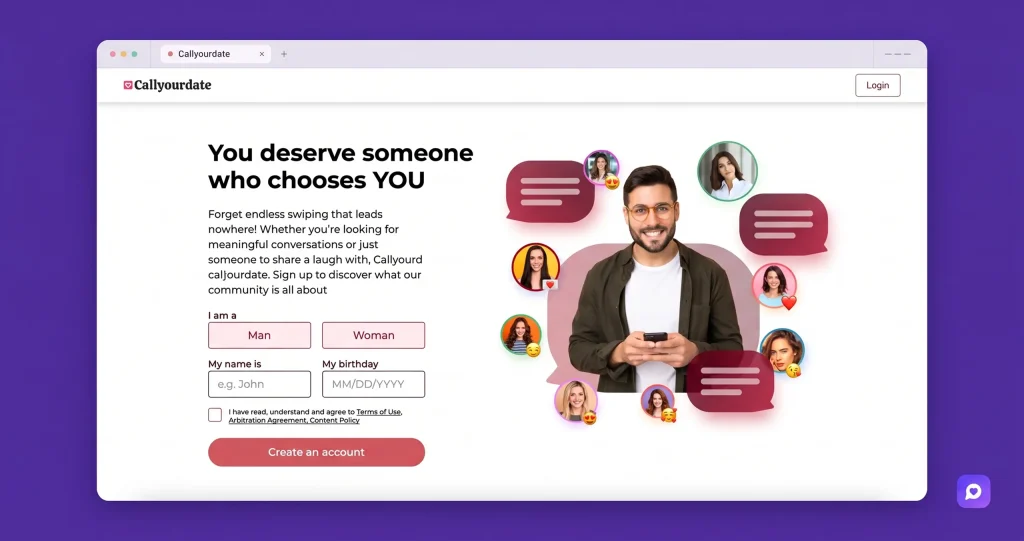
The Callyourdate sign-up form sits right on the homepage, and the first part is quick. Writing a profile I was happy with took me much longer, and I think that’s intentional.
Step 1: Basic details
The form asks three things: whether you’re a man or a woman, your first name, and your birthday. You tick a box to accept the Terms of Use, Privacy Policy, Payment and Refund Policy, and the other documents, then press “Create an account”.
Step 2: Email confirmation
Next come your email address and a password. Callyourdate sends a confirmation link, and the account becomes active once you click it. Use an address you check regularly, because support also replies to confirmed emails only.
Step 3: Writing the “About Me”
This is where I slowed down. Callyourdate asks for a few lines about yourself, your interests, and your preferences for who you’d like to hear from. I rewrote my “About Me” twice that first evening before settling on something short about how I like to unwind and what I’m curious about. I added a clear main photo, one full-length picture, and a photo from an autumn walk.
Logging in later
The Callyourdate login is simple: press “Login” in the top-right corner of the homepage and enter your email and password. My phone’s browser saved my details, so getting back in each evening took seconds.
Week One: Learning the Pace
On my first evening, I didn’t write to anyone. I scrolled the newsfeed instead, which the platform itself suggests: members post photos and short updates about their day, and reading them felt more like catching up with acquaintances than browsing profiles. One post about a failed attempt at baking bread made me smile, and that became my first message.
The replies came slowly, often the next evening rather than the next minute. On a swipe-first app that would worry me, here it fit the pace. By the end of the week I had a handful of conversations going, none of them rushed, and I noticed I was looking forward to logging in after work.
Week Two: Finding a Rhythm
The second week is when the platform’s quieter tools started to matter. Saved drafts became my favorite: I’d start a reply, close the laptop, and finish it the next evening with something better to say. Nothing was lost, and nothing pushed me to send it before I was ready.
One conversation grew long enough that I switched from instant chat to long-form letters. Letters let you write properly and attach photos, so I shared a picture of the view from my evening walk and got a long, thoughtful reply about a favorite place by the sea. That exchange felt closest to what Callyourdate promises: slow, warm, and easy to enjoy. I also started following a few members whose posts I liked, so their updates showed up first in my feed.
Week Three: Where It Frustrated Me
By the third week, the gaps became harder to ignore. I wanted to find people who enjoy hiking, but the search only filters by country, age, gender, and online status, so I was back to reading profiles one by one. On my phone, some buttons were small enough that I tapped the wrong conversation more than once.
This was also the week when paid features came into play. Registration and browsing cost nothing, but writing personal messages is subject to a fee, and in a platform where everything revolves around messaging, you feel that quickly. Finally, my identity verification took longer than I expected to complete. None of this ruined the experience, but together these points are why my score is lower than the calm atmosphere alone would suggest.
Callyourdate Features, Ranked by How Often I Used Them
- Newsfeed
My starting point almost every evening. Posts and photos told me more about people than profiles did, and liking or commenting on a post made a natural first message. - Saved drafts
Unsent messages are saved automatically, so you can come back to them later. A small feature that suits the platform’s pace perfectly. - Long-form letters
Longer messages, closer to email, with the option to attach photos. Ideal for conversations that need more room than a quick back-and-forth. - Conversation starters and private-chat templates
Ready-made opening lines take the pressure off the first message, and inside private chats you can use saved openers or add your own. I used them a few times, though they could offer more variety. - Instant chat
Short, quick messages that work like any messenger. I used chat for first exchanges and simple questions. - People feed and follows
A discovery feed of suggested profiles where you can like, add to favorites, or follow members to see their updates. - Search filters
Country, age, gender, and online status. Enough for basic browsing, but I missed filtering by interests. - Stickers and photo sharing
You can share photos in conversations and add stickers to messages. Stickers are a paid feature.
Is Callyourdate Safe? What I Tested
A calm atmosphere matters only if you also have control. Here’s what Callyourdate gives you and how it worked for me.
Block and report
Every profile has options to block or report. Blocking stops all further interaction with that person, and reporting sends the profile or message to the moderation team with a reason. The platform combines automated detection with human moderation to review reports and suspicious behavior. I reported one user in my second week, and the report took only a few taps.
Verification and age checks
Identity verification is available and encouraged, and many users can be verified. It’s conducted by an industry-leading third-party vendor and may take some time, which was true in my case. There’s also an age check: if the platform suspects someone may be underage, it won’t allow registration until verification is completed, or it blocks the profile if the concern comes up later.
Visibility settings
You can manage who sees your profile in the settings, and profile activity on Callyourdate is not visible to search engines, so your profile doesn’t show up when someone searches your name.
Safety Center and Safety Guides
Both are linked in the site footer. They explain how blocking, reporting, and moderation work and include practical advice, such as not sharing financial details or sensitive personal information with people you’ve just started talking to. Adult and copyrighted content, chain letters, and spam are prohibited.
Overall, the platform takes measures to minimize unwanted content and detect suspicious activity, and the tools to protect yourself were easy to find.
Is Callyourdate Legit?
Users might be wondering if Callyourdate is a scam, especially in the field of digital communication, where trust has to be earned. So I checked what I could myself.
The site lists the company behind it (available to check in the footer) and publishes its Terms of Use, Payment and Refund Policy, Acceptable Use Policy, Arbitration Agreement, Privacy Policy and Cookie Policy, along with a Transparency page. Support contacts are published openly. On Trustpilot, Callyourdate has a claimed profile that shows it replied to 100% of negative reviews, typically within 24 hours (as of November, 2026). During my three weeks, sign-up, features, and support behaved the way the site describes them.
Callyourdate Customer Service
Callyourdate suggests starting with the Help Center and Safety Center, since many answers are already there. If that doesn’t help, you can use the contact form, email support@callyourdate.help, or send a quick question in the chat. The homepage says the team is there 24/7.
In my third week, I used the form to ask why my verification was still pending. A friendly, clear reply arrived by the next evening, explaining that verification can take some time and that I didn’t need to do anything else. A tip that worked for me: confirm your email first and include details, such as your account information or a screenshot, so support can help without extra questions.
Is There a Callyourdate App?
There’s no separate Callyourdate app at the moment. The platform relies on a mobile website that adapts to your phone. It worked for reading the feed and quick replies, but for letters and longer sessions I always went back to my laptop, and the small buttons on my phone are the main reason I gave mobile 3 out of 5.
Tip: add the site to your home screen. In Safari, tap Share and then “Add to Home Screen”; in Chrome, open the menu and choose “Add to Home screen”.
What’s Free and What’s Paid
You can join for free: creating an account, filling in your profile, browsing members, and reading the newsfeed are part of registration. Features such as stickers and personal messages are subject to a fee. Since conversation is the heart of Callyourdate, it’s worth reading the Payment and Refund Policy in the footer before you start writing.
Callyourdate Pros and Cons
What I liked
- A calm, unhurried pace that suits evening use
- Newsfeed that helps you get to know people first
- Saved drafts and long-form letters with photos
- Easy block and report tools
- Friendly support and openly published company details
What could be better
- Search filters limited to country, age, gender and online status
- No separate app; some buttons are small on a phone
- Some features, such as stickers and personal messages, are subject to a fee
- Identity verification can take some time
- Conversation starters could offer more variety
What Other Members Say
Three weeks on one profile is one experience, so I also read Callyourdate reviews on independent review sites. Here’s where the platform stands and what members wrote.
Ratings on review sites (as of November 25, 2026)
| Source | Rating | Number of reviews |
|---|---|---|
| Trustpilot | 3.4 / 5 | 205 |
| ResellerRatings | 4.02 / 5 | 19 |
| ProductReview.com.au | 4.5 / 5 | 4 |
“…the pace is slower and nobody pushes you. conversations build gradually. works well for someone like me”
★★★★★ Giatondao, May 19, 2026, ResellerRatings
“Easy to use. Good info. Easy to upload images.”
★★★★★ Kimberly Colletti Gracon, November 19, 2026, Trustpilot
“The wait time wasn’t long and Courtney explained as she was checking something for me. Very personable and friendly…”
★★★★★ MaryAnn Waseline, November 15, 2026, Trustpilot
“It is an exciting new adventure, and i like chatting with people here. Very easy to get everything done…”
★★★★★ Siddhartha P., November 2026, ProductReview.com.au
“Been on here a couple of weeks. Search filters have been unreliable. Not a dealbreaker but noticeable”
★★★★☆ Brenda, June 2026, ProductReview.com.au
“the buttons are so tiny on my screen it feels like this site was built in 2010. really hard to just tap on a chat without zooming in.”
★☆☆☆☆ Gwladys, April 21, 2026, ResellerRatings
These excerpts are a selection from public review sites, chosen to show both positive and critical feedback. They are individual opinions, may be shortened (marked with “…”), and may not represent every member’s experience.
Recurring complaints. The most common criticism is the cost of paid features, especially on Trustpilot, where 25% of the 205 ratings are one star. Some reviewers wanted more freedom in how they communicate, and a few doubted the intentions of certain profiles. Others mention search filters that don’t work as expected and buttons that are hard to tap on a phone, both of which I ran into myself. On the positive side, support comes up again and again as prompt, polite, and helpful.
What I’d Change About Callyourdate
Callyourdate gets the feeling right. What holds it back are practical things, and most of them seem fixable:
- Interest filters. Searching by hobbies would make the slow pace even more rewarding, because first messages would start from something you share.
- Larger tap targets on mobile. For a platform used in the evening from the sofa, the phone experience deserves more attention.
- A native app. Not essential, but it would make daily check-ins easier.
- Faster verification. Many users can be verified, and shorter waiting times would encourage more people to do it.
- More conversation starters. A wider choice would help the first message feel more personal.
Who I’d Recommend Callyourdate To
I’d recommend Callyourdate to people who want a calmer way to connect online: those who like to read before they write, enjoy longer letters, and prefer one warm conversation to a crowded inbox. It suits evenings, weekends, and quieter days, when you want someone to talk to without pressure.
It’s probably not the right fit if you rely on detailed search filters, want a native app, or would rather have every feature included in registration.
My Final Verdict
Callyourdate delivers the calm it promises: the newsfeed, saved drafts and long-form letters made my evenings on the platform feel slow and pleasant rather than rushed. Support was friendly, and the block and report tools are easy to use. Limited search filters, small buttons on mobile and paid personal messages hold it back, so it suits people who value the pace of a conversation more than the number of options.
Visit Callyourdate